
Get Asynchronous Support & Coaching
Communication via messages, without disrupting your busy schedule
Privately chat with industry practitioner, Marlon McPherson, via voice note, text, and video recordings, using a dedicated chat app.
Get personalised guidance to implement systems for your website, online content, and marketing funnel so you can grow online.
How to Get Started

Book Some Time
Reserve a block of time to cover our communications and any analysis or tasks that needs to be done.

Get Access
You'll receive a link to access a my online community where we can directly message each other via a chat app .

Ask Your Questions
Send your questions using text, voice note, or share a screen recording. Include access to your website if needed.

Get Support
I’ll reply to your questions and provide further guidance, feedback, or resources to help you problem-solve or make progress.
If I didn't buy things like this, I wouldn't have a clue where to start... really helpful
Benefits of Asynchronous Support
Because an asynchronous session means there's no real-time or live communication, there are several benefits that can make it more effective.
👉More Convenience - you can get on with your day and communicate when you're ready. No need to show up on a live call at all.
👉Clearer thinking - no need to rush your thoughts as you can take the time to formulate your questions and process the responses.
👉More Affordable - it generally costs less than live coaching sessions but can be just as powerful, if not better.
👉Higher Quality Feedback - I get the opportunity to look at things more closely and present a more measured response.
👉Avoid Social Anxiety - if you struggle with live calls because you're shy or feel awkward, this makes your life easier.
Easy Communication on Heartbeat Chat
Whether you're on a desktop or laptop, or you're using a mobile phone, we'll be able to message each other either from your web browser or by using the Heartbeat Chat mobile app.
Heartbeat Chat is a private platform where I've set up my online community, Future Steps Creative.
It allows me to create private spaces, share resources, and communicate without outside distractions.

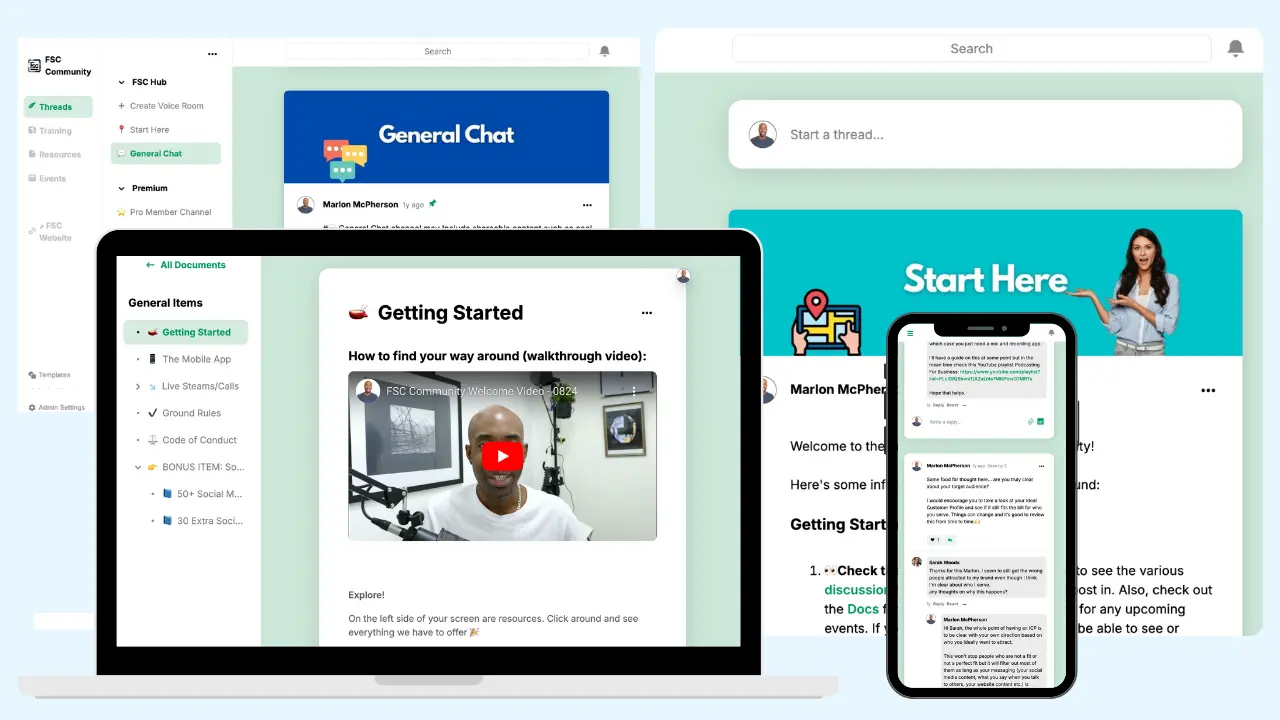
When you sign up for a Private Session, you'll also get the opportunity to get ongoing help and guidance inside the group chat area. However, this is optional, so if you only want a private session, that's fine.
See some of the benefits below.
Direct message at any time by sending text, voice notes. You can include attachments or links
Mobile app for iOS and Android phones, so that you can communicate on the go
Works on Windows or Mac via major browsers on a desktop or laptop computer. There's also a desktop app available for Macs
Private docs where you can access notes and other resources for you to reference later
Optional: Interact in the community group threads and access special content
Optional: View additional resources such as video training, helpful docs, downloadable templates and more for online systems strategy
What I Can Help With
Maybe you sell services, info products, an online course or membership. Or, you're trying to grow your brand awareness with online content.
Below are some of the things you can request. You can also view my Tech List here.

Website feedback to help you improve user experience, lead generation, or sales (home page, sales page, or product page)
Guidance on content creation strategy and workflows to help you stay active and get more reach (video, podcast, or social media)
WordPress tools and plugins (for marketing, sales, and content delivery)
Using the Divi Theme/Page Builder or the Astra Theme for landing pages
Membership and online course setup guidance (SureMembers + Learndash)
Setting up and using FluentCRM and Fluent Forms to generate leads, make sales, and grow your email list.
Email strategy for automated lead follow-up, long-term nurturing, sales generation, and client onboarding.
Guidance on processes and tools for better workflows with marketing, productivity, and systems automation
Help solve common issues with specific wordpress plugins or themes
Analysis of your sales process and lead follow-up systems to help improve conversions and average order value
15-Minute Session
Great for smaller requests, like quick questions or feedback.
Communications using the Heartbeat Chat app in your browser or via mobile app.
Replies within 2 business days
15 minutes of asynchronous support and guidance.
Private Resource Page
Access notes, resource links, and action steps.
$40 One-time investment
*By booking, you confirm that you have viewed the App Support List and agree to the information for this service and the Privacy Policy.
30-Minute Session
Ideal for multiple smaller requests or several questions.
Communications using the Heartbeat Chat app in your browser or via mobile app.
Replies within 2 business days
30 minutes of asynchronous support and guidance.
Private Resource Page
Access notes, resource links, and action steps.
$60 One-time investment
*By booking, you confirm that you have viewed the App Support List and agree to the information for this service and the Privacy Policy.
60-Minute Session
Ideal for larger requests such as, workflow demonstrations or tech guidance.
Communications using the Heartbeat Chat app in your browser or via mobile app.
Replies within 2 business days
60 minutes of asynchronous support and guidance.
Private Resource Page
Access notes, resource links, and action steps.
$100 One-time investment
*By booking, you confirm that you have viewed the App Support List and agree to the information for this service and the Privacy Policy.
FAQ
Frequently Ask Questions
Q. What happens after I book?
Once you place an order, you'll receive a link to set up your access to the chat app.
We'll be using Heartbeat Chat, which is the platform I use for my online community (Future Steps Creative) and allows for direct messages to be sent.
You'll be able to either access the platform from a desktop browser or from your mobile (iOS or Android app).
Q. How does the time get used or calculated?
Time is deducted in 5-minute increments for my responses, depending on the level of thinking required and the responses themselves (rounded up to the nearest 5 minutes).
You can send as many questions as you want (within reason), and I will answer them in 1 or 2 batches per day (like a mini session). My responses can take up to 2 working days; however, I expect to reply within 24 hours.
Here are more details:
- Quick check-ins/questions - 2 to 3 sentence text or voice note reply: [5 minutes deducted]
- Deep questions (requires research, analysis, or in-depth thinking): 15+ minute voice note or multi-paragraph text - [15+ minutes deducted]
- System checks/reviews ( e.g. website critique, social media, or content review) - replies usually with a screen recording or voice note and written notes: [15-30 minutes deducted]
*Typically, thinking time is more than the response, so this is taken into account when deducting time. Time will be rounded up to the nearest 5-minute increment, and you will be kept informed about your time usage.
Q. What if I run out of time?
I will answer questions in the order you ask them, so put the most important questions first. I will try my best to address them all; however, if what you ask needs more than the available time, I’ll let you know, and you can book more time to carry on.
Q. How do I send you a screen recording?
You can use an app like Loom to record your entire screen or a window and share the link to the recording.
If you do not have access to a tool, I can send you a link to request a screen recording video without having to create an account.
Q. Will you make changes to my website for me?
In some cases, I will log into your WordPress website or supported application to look at an issue or check your settings. I will then send you a recording explaining what to do.
If you wish for me to make changes, I prefer it to be a development site or a staging site (a copy of your real site). This way, your live operations don't get disrupted.
If I must make changes on a live site, you must take full responsibility for any disruption or issues that may occur during the process.
Q. How do I give you access to my website?
You can add me as a user to your WordPress website or use a temporary access plugin to generate an access link. Instructions will be provided after booking.
Q. How can I talk with you live?
You may book a Live 1-1 Session where we can talk via video conferencing using Google Meet or a similar app.
See the services page or get in touch for more details.
Q. Do you offer refunds?
If I see that you've requested something that is outside of my expertise or something that I cannot offer, I'll promptly refund you.
If a session has already started then refunds are at my discretion.
My priority is to help you solve problems and ensure you are happy with the outcome, so I will go out of my way to deliver before considering a refund.
Is this for you?
This is for you IF…
- You want to improve your online presence, customer experience, and business processes
- You want guidance and don’t want to waste a lot of time going round in circles
- You're willing to take constructive criticism or feedback
- You’re an action-taker and very motivated
This is NOT for you if...
- ❌You secretly want to be validated and not take advice or direction
- ❌You are expecting the work to be done for you; I will only advise and coach you, or occasionally provide some hands-on assistance
- ❌You are not serious about making progress with your systems or strategy